
Could a car that looks affordable on the forecourt bring unexpected costs after you’ve bought it? Checking vehicle tax and insurance group before buying helps you build a clearer picture, but these are separate checks and neither tells the whole story. A vehicle’s tax record shows its current tax position, while its insurance group is a guide to risk, not a guaranteed quote.
Check both before you commit, especially if an advert doesn’t make the tax position clear. Use the registration number to check the tax status on GOV.UK, then look up the insurance group using the registration or the car’s exact make, model and version. For a realistic idea of your own premium, get a personal insurance quote.
This checklist explains what each check can tell you, where to find the information and what to confirm before paying or driving away. It also shows how to compare vehicles consistently, so tax status, insurance grouping and your next steps form part of a considered buying decision.
Key Takeaways
- Start checking vehicle tax and insurance group before buying with the vehicle’s registration number, then confirm the details match the car you’re considering.
- Use GOV.UK to check the vehicle’s tax status and make sure the result relates to the vehicle you intend to buy.
- Treat the insurance group as a comparison guide, not a promise of what your own insurance will cost.
- Get a personal insurance quote using the correct vehicle details before making your decision.
- Use a consistent pre-purchase checklist to bring together the tax record, vehicle identity and insurance information.
Why check vehicle tax and insurance group before buying?
A car’s asking price is only part of the decision. Before committing, check the ongoing obligations that could affect whether you can use the vehicle and what it may cost to insure. Checking vehicle tax and insurance group before buying helps you compare these factors, but they answer different questions.
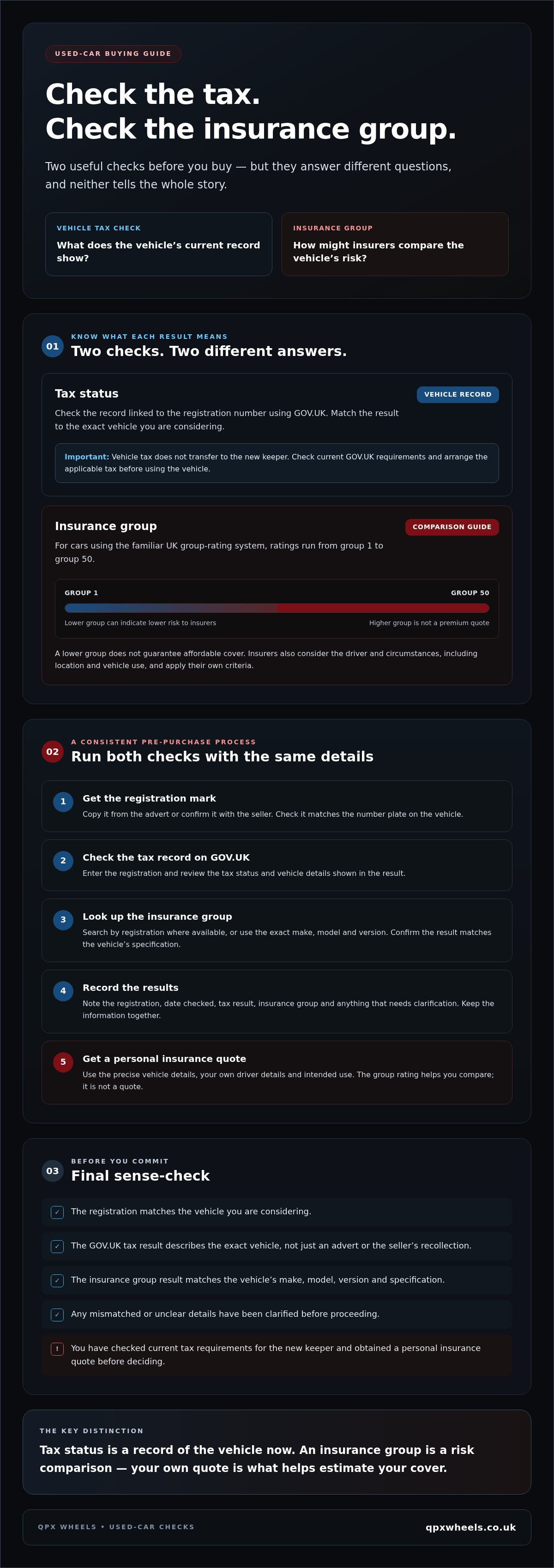
Vehicle tax, formally known as Vehicle Excise Duty (VED), is a legal requirement for vehicles used on public roads, unless an exemption applies. An insurance group, by contrast, is one factor insurers use to assess and compare a vehicle’s risk. Neither check gives you a complete picture of future costs. A tax-status result isn’t a personal insurance quote, and it may not tell you exactly what tax will apply to you after the sale.
In brief: tax status tells you what the vehicle’s current record shows; its insurance group helps you compare how insurers may assess the vehicle.
What does a vehicle tax check tell you?
Use the registration number to check the vehicle’s recorded tax status through the vehicle enquiry service on GOV.UK. This shows the record associated with the registration, rather than relying on an advert or the seller’s recollection. Check that the result describes the exact vehicle you’re considering.
A current tax record doesn’t mean the vehicle will remain taxed when ownership changes. Vehicle tax doesn’t transfer to the new keeper, so check the current GOV.UK requirements and arrange the applicable tax before using the vehicle. The status check is a useful first step, not a substitute for confirming what you must do as the buyer.
What does an insurance group tell you?
For cars covered by the familiar UK group-rating system, ratings run from group 1 to group 50. A lower group can indicate that insurers consider a vehicle lower risk than one in a higher group, but it doesn’t set your premium or guarantee affordable cover.
Insurers also consider the driver and the circumstances, including details such as location and vehicle use. Each insurer applies its own criteria, so the same car can lead to different quotes for different people. Use the group to compare vehicles, then seek a personal quote using the correct vehicle and driver details before deciding what fits your budget.
How to check a used vehicle’s tax status and insurance group
Use the same registration and vehicle details throughout both checks. This helps you spot mismatches and compare like with like. When checking vehicle tax and insurance group before buying, follow these steps before making a decision:
- Get the registration mark. Copy it from the advert or ask the seller to confirm it. Check it matches the number plate on the vehicle you’re considering.
- Check the tax record on GOV.UK. Use the official Check a vehicle’s tax status service and enter the registration. Review the tax status and vehicle details shown in the result.
- Look up the insurance group. Use a reputable insurer or insurance-group checker. Search by registration where available, or enter the exact make, model and version. Check that the result relates to the vehicle’s specification.
- Record what you find. Note the registration, date checked, tax result, insurance group and anything that needs clarification. Keep the results with your other vehicle information.
- Get a personal insurance quote. Enter the precise vehicle details and your own driver and intended-use information. A group rating helps with comparison, but it isn’t a quote.
Check the tax record using the registration number
GOV.UK’s vehicle tax service lets you check the record associated with a registration. Compare the displayed details with the advert and the vehicle itself. If the make or another identifying detail doesn’t match, or the result is unclear, pause and ask the seller to clarify before proceeding. A registration entered incorrectly won’t give you a meaningful result.
Find and confirm the insurance group
Be specific when searching. A model name alone may cover several versions, and trim, engine, age and specification can affect whether a group result is relevant. If a checker returns several options, compare them with the vehicle documents or ask the seller for the exact version details. Then request a quote for that vehicle using your own circumstances. Another driver’s quote, or the group rating alone, can’t tell you what you’ll pay.
Keep the checks together and follow up any gaps before committing. Once you’ve confirmed the details, you can compare used cars with a clearer idea of what to verify for each one.
How to compare tax and insurance group without misreading the results
These checks serve different purposes, so don’t treat either as a complete ownership-cost estimate. A tax-status check is a snapshot of the vehicle’s recorded position. An insurance group helps you compare the vehicle’s risk profile, but doesn’t tell you what an insurer will charge you.
| Check | What it can tell you | What it can’t confirm |
|---|---|---|
| Vehicle tax status | The tax status recorded for the vehicle when you check it. | The tax amount or liability that will apply to you after purchase, or your full running costs. |
| Insurance group | A comparison indicator insurers can use when assessing vehicle risk. | Your personal premium or whether a particular insurer will offer cover. |
Use both results as prompts for further checks, not as a simple verdict that a vehicle is affordable or expensive. Vehicle tax depends on details such as the vehicle’s registration and the applicable tax rules, which can change. Confirm current information with GOV.UK rather than relying on an old advert or a figure saved from an earlier search. For context on insurance groups, Thatcham Research explains how insurance groups are determined.
Why a low insurance group does not guarantee a low quote
An insurance group is a comparison indicator, not a guaranteed premium. It relates to the vehicle, while insurers also assess details about the driver, intended use and other circumstances. They apply their own criteria, so the same car can produce different quotes for different drivers.
Before treating a vehicle as affordable, compare quotes using the exact car and your own details. Check that the version selected matches the registration, engine and specification you’re considering. A group rating can help you narrow down options, but only a personal quote gives you a price for your circumstances.
Why a tax-status result is not a full ownership-cost forecast
A vehicle’s current tax record doesn’t settle what you’ll need to pay as its new keeper. The applicable tax depends on vehicle-specific details and the rules in force. Even a figure in an advert may be outdated or relate to a different version of the vehicle.
Check the current GOV.UK guidance and confirm the relevant details for the exact vehicle before you commit. Then consider tax alongside a personal insurance quote and your other expected running costs. This keeps checking vehicle tax and insurance group before buying in perspective: each check reduces uncertainty, but neither replaces the next step in assessing affordability.
Pre-purchase checklist: what to confirm before buying
A short, consistent checklist can help you catch mismatches before you pay or arrange to drive the vehicle away. Use it alongside your other checks: tax and insurance information won’t confirm a vehicle’s history or condition.
The checks to complete before paying
Work through these points for the exact car or van you’re considering. Keep a note of the results so you can compare them with the advert, vehicle and documents.
- Registration: Record the registration mark from the listing or seller, then check it matches the number plate on the vehicle and the registration shown in its documents.
- Vehicle details: Compare the make, model, version, engine and other available specification details across the advert, documents and check results. Don’t assume two vehicles with a similar model name are identical.
- Tax record: Use the official GOV.UK vehicle tax check and confirm the result relates to the vehicle you intend to buy. Check current GOV.UK guidance for the tax requirements that apply to you after purchase.
- Insurance group: Look up the group for the exact vehicle version. If the result lists several variants, confirm which one matches the vehicle’s specification before relying on it.
- Personal quote: Obtain an insurance quote using the correct vehicle details and your own driver and intended-use information. The group rating alone can’t tell you what cover will cost.
- Other checks: Carry out appropriate vehicle history and condition checks as well. Tax and insurance checks are useful, but they don’t replace those separate assessments.
What to do when information does not match
Pause if the registration, specification or records conflict. Ask the seller to explain the difference, then check the corrected details against the vehicle and relevant documents. For example, if a group result is for a different engine or version, search again using the accurate specification. Don’t treat a seller’s statement or an unverified online result as confirmation.
If the tax record is unclear, the vehicle details don’t match, or reasonable questions remain unanswered, resolve the issue before paying or arranging to drive away. Keep a record of what you checked and when. This gives you a clear basis for comparing vehicles instead of relying on assumptions.
Once you’ve completed your checks, compare suitable used cars with the vehicle details and running-cost information in hand.
Make a confident used-car decision with QPX Wheels
Once you’ve completed the checks, bring the results together before deciding. First, match the vehicle’s registration and specification to the advert and documents. Then check its tax position, confirm the insurance group for that version, and obtain a personal insurance quote. Include the applicable tax and your actual quote in your ownership assessment rather than relying on the group rating or an advert alone.
Checking vehicle tax and insurance group before buying can help you ask clearer questions and compare vehicles consistently. It doesn’t replace other checks, but it can help you decide whether a particular car or van merits further consideration.
Questions to ask before choosing a vehicle
Before you proceed, make sure the details used for your checks describe the vehicle being offered. If anything is unclear, ask the seller to confirm it and explain any differences between the listing, documents and check results.
- Does the registration match the vehicle and its documents?
- Are the model, trim, engine and other relevant specification details clear?
- If a tax result or insurance-group lookup doesn’t appear to match, can the difference be explained and verified?
- Have you obtained a personal insurance quote for the exact vehicle and your intended use?
- Have you checked the current tax requirements that apply after purchase?
If you’re considering finance, review the agreement details separately. Finance arrangements don’t replace checking the vehicle’s tax position or obtaining an insurance quote, so account for these obligations independently when assessing affordability.
Next steps with QPX Wheels
QPX Wheels is an independent retailer of used cars and vans, with nationwide delivery available. Once you know what specification and running costs suit your needs, compare available vehicles and ask questions about the vehicle information before deciding. If you’re considering finance, Hire Purchase (HP) and PCP options are available. Review the relevant agreement details to understand what they involve.
There’s no need to rush the decision. Complete the checks, follow up anything that doesn’t match, and choose a vehicle that fits your requirements and ownership assessment. Browse used cars and vans with QPX Wheels when you’re ready to explore the options.
Take your checks into your next vehicle search
Checking vehicle tax and insurance group before buying gives you two useful pieces of information, but neither should be mistaken for a complete ownership-cost estimate. Confirm that the registration and specification match the vehicle, check its tax position using current official guidance, and treat the insurance group as a comparison guide rather than a personal quote. An actual insurance quote gives you a more useful basis for assessing affordability.
Once you’ve resolved any differences between the advert, vehicle details and check results, you can compare suitable options with greater confidence. QPX Wheels is an independent retailer of used cars and vans, with nationwide delivery available. Hire Purchase and PCP finance options are also offered. Review any finance agreement separately as part of your decision.
When you’re ready, browse used cars and vans with QPX Wheels. Take your time, ask questions and choose a vehicle that fits your needs and budget.
Frequently Asked Questions
How do I check if a used car is taxed before buying it?
Enter the car’s registration number into the vehicle tax checker on GOV.UK. Review the tax status and vehicle details, then compare them with the car and its documents. The result reflects the record at the time of your check; it doesn’t confirm what tax you’ll need to arrange after purchase. Check current GOV.UK guidance before using the vehicle, and follow up unclear or conflicting details with the seller.
Can I check a vehicle’s tax status using its registration number?
Yes. The official GOV.UK vehicle tax service uses the registration number to show the tax record and key vehicle details. Check that the registration you enter is correct and that the result describes the exact car you’re considering. If the displayed make or other information doesn’t match the vehicle or advert, ask the seller to clarify the discrepancy before proceeding.
What does an insurance group tell me about a car?
An insurance group is a vehicle risk indicator that helps insurers compare cars. The UK group-rating system places cars in groups from 1 to 50, with a lower group generally indicating lower assessed risk than a higher one. It doesn’t account for your individual circumstances or set the price of your cover. Use the group to compare similar vehicles, then get a quote for the exact car and your details.
Does a lower insurance group mean cheaper car insurance?
Not necessarily. A lower group can be a useful comparison point, but it doesn’t guarantee a lower premium for you. Insurers assess more than the vehicle, including driver details, location and intended use, and their criteria can differ. Two people considering the same car may receive different quotes. Before deciding a vehicle is affordable, obtain a personal quote using the correct model, version and your own circumstances.
Can I tax a car straight after buying it?
Yes, you can arrange tax after buying a car, but don’t assume the seller’s tax carries over. Vehicle tax doesn’t transfer to a new keeper, so check the current GOV.UK instructions and arrange the applicable tax before using the car. You’ll need the relevant vehicle or new-keeper information to complete the process. If you’re unsure which details to use, check GOV.UK rather than relying on the advert or the previous keeper’s record.
What happens if the vehicle’s tax details do not match the advert?
Pause and check that you entered the correct registration, then compare the official result with the vehicle and its documents. Ask the seller to explain any mismatch, such as a different make or vehicle detail, and seek clarification before paying or arranging to drive away. Don’t treat an advert or verbal assurance as proof of the tax record. If the discrepancy remains unresolved, don’t rely on that result to make your decision.
Should I get an insurance quote before buying a used car?
Yes. Getting a quote before you commit helps you assess the cost of insuring the exact car for your circumstances. Use the correct registration or vehicle specification, alongside accurate driver and intended-use details. An insurance group is only a comparison indicator, not a personal premium, so it can’t tell you what cover will cost. Include the quote and applicable vehicle tax in your ownership assessment before choosing a car.


