
A built-in sat nav isn’t automatically the best choice for every journey. If you’re searching for used cars with sat nav UK, a listing’s feature label won’t tell you whether the maps are current, how updates work or whether your phone can connect to the screen.
The right setup depends on how you travel and which controls you find easiest to use. You might prefer navigation integrated into the dashboard, or find phone navigation through Apple CarPlay or Android Auto more convenient. Either way, test the system before you buy: enter a destination you know, check the route display and see how the instructions appear.
This guide explains the main sat nav options you’re likely to encounter and what to check in the car, from map coverage and update arrangements to connectivity and ease of use. You’ll also learn how to compare systems using familiar journeys, so you can choose a used car whose navigation suits your everyday needs.
Key Takeaways
- Sat nav in a used-car listing can describe different setups, so identify what the feature includes before comparing vehicles.
- When weighing built-in navigation against phone-based options, consider how you’ll use the screen and whether you want your phone connected.
- Use your regular commute, longer drives and unfamiliar routes to judge which navigation setup feels practical for you.
- During a viewing, try entering a destination and following the route guidance to see how clearly the system works.
- Use this checklist when browsing used cars with sat nav UK, then explore QPX Wheels’ used-car range, with nationwide delivery available.
Used cars with sat nav UK: what does the feature actually include?
What does “sat nav” mean in a used-car listing? Usually, it refers to an in-car navigation system that helps you plan a route and guides you towards your destination. The label alone doesn’t tell you whether navigation is built into the car, displayed through a connected phone or supplied by a separate device.
A factory-fitted system uses navigation hardware and software within the vehicle. It determines the car’s position using satellite navigation, then uses map data to show roads and calculate routes. The display and controls are part of the setup, too. For an overview of the technology behind satellite navigation systems, it helps to think of these as connected but distinct parts.
- Navigation hardware: Equipment that works out the vehicle’s position and supports route guidance.
- Map data: Digital roads and places the system uses to display a map and plan a route.
- Screen and controls: The interface for viewing maps, choosing destinations and adjusting the system.
- Connected services: Additional information, such as traffic updates, which may rely on an internet connection or a separate service.
These elements don’t necessarily share the same update arrangements or requirements. A system can provide basic route guidance without online traffic information, for example. Equipment and functions can also vary by vehicle, trim and model year. Don’t assume that two cars carrying the same feature label work in exactly the same way.
What can factory-fitted sat nav do?
A built-in system can show a map on the car’s display and provide directions as you travel. Depending on the vehicle, you might enter a destination using a touchscreen, physical buttons, voice commands or steering-wheel controls. These are examples, not a standard set of features. Live traffic information and other online services are separate from core navigation and may depend on the system’s specification and connectivity.
Does a sat nav badge mean every feature is included?
No. A listing may use “sat nav” as a broad equipment label without explaining how navigation appears or what services are available. Built-in navigation is different from phone projection, which displays compatible smartphone apps on the car’s screen, and from a standalone sat nav device mounted separately. Each setup has its own controls and dependencies. Focus on what’s fitted in the specific vehicle rather than assuming the label includes extra capabilities.
When comparing used cars with sat nav UK, look for clues about the system type, then assess the actual display and controls in the car. Check whether navigation is built in or phone-based, and whether the screen shows a map, route instructions and the functions you expect to use. That gives you a clearer basis for comparing vehicles than a short listing description alone.
Built-in sat nav or phone navigation: which suits your used car?
Factory-fitted navigation and smartphone apps can both guide you to a destination, but they work differently. Built-in sat nav uses the car’s own interface. Phone navigation relies on a compatible connection between your smartphone and the vehicle, or on using the phone separately. The better fit depends on which screen and controls you find easier to use and what you’ll rely on during regular journeys.
Use this comparison as a starting point, not a guarantee of what a particular car can do. Features vary between vehicles, so check the system in the car you’re considering.
| What to compare | Built-in navigation | Phone navigation |
|---|---|---|
| Display | Uses the car’s navigation screen and interface. | May appear on the car’s screen through a compatible phone-projection system, or on the phone itself. |
| Phone reliance | Basic route guidance may work through the vehicle’s own system. | Requires a suitable phone and app; screen projection also depends on vehicle compatibility. |
| Connectivity | Online features, such as traffic information, may need a connection or service. | App features can depend on mobile data and signal, as well as the phone connection. |
| Updates | Map update arrangements depend on the vehicle and navigation system. | Map information comes from the app, though access to online features depends on connectivity. |
When might factory-fitted navigation suit you?
Choose this route if you prefer directions presented through the car’s own interface rather than relying on your phone’s display. The layout, controls and available functions differ between vehicles. During a viewing, check how clearly the route appears, whether the map shows places you recognise and whether destination entry feels straightforward. Don’t assume that traffic or other online services are included with basic navigation.
When might phone-based navigation suit you?
Phone navigation may suit you if you already use an app and want its directions on a compatible in-car display. The car must support the relevant phone-projection system for this to work on its screen; not every vehicle supports Apple CarPlay or Android Auto. Phone access, mobile data, signal and connection method can all affect the experience. Consider these requirements against the routes you usually travel and how you prefer to use your phone.
Whichever option you favour, check map-update arrangements and connectivity for the specific vehicle rather than assuming they’re the same across a model range. If you’re comparing used cars with sat nav UK, decide whether you value an integrated interface or prefer using a phone, then try the available system and controls in person. That makes it easier to judge which setup fits your needs.
Once you know what to look for, you can browse QPX Wheels’ used cars with your preferred navigation setup in mind.
How to compare used cars with sat nav for your everyday journeys
A navigation system is most useful when it fits the trips you actually make. Think about your regular commute, longer drives and how often you travel somewhere unfamiliar. If you mainly follow familiar roads, a simple, easy-to-read display may be enough. If you often travel to new destinations, clear route instructions and straightforward destination entry may matter more.
Use the table to compare each car against the same practical criteria. Mark essentials separately from features that would simply be handy.
| What to compare | Questions to ask yourself | Priority |
|---|---|---|
| Screen usability | Can you read the map clearly from the driving position? Is the display easy to understand at a glance? | Essential if screen clarity affects your confidence. |
| Route clarity | Are upcoming turns and route changes easy to follow? Can you enter a destination without struggling with the controls? | Essential for regular unfamiliar journeys. |
| Connectivity | Does the system work independently, or would you need a phone connection? Would mobile signal or data affect your preferred setup? | Essential if you plan to use phone-based navigation. |
| Map updates | Can you establish how current the maps are and what update arrangements apply to that system? | Useful to understand before deciding. |
| Extra connected functions | Are traffic information or other online features available, and do you expect to use them? | Optional convenience for many buyers. |
Which navigation details matter most to your routine?
Start with your journeys. If you mainly travel familiar routes, prioritise an uncluttered display and controls that feel straightforward. If you often visit new places, pay closer attention to route clarity and destination entry. For phone-based navigation, consider whether you’ll have access to your phone, a suitable connection and mobile data when needed. Treat connected extras as optional unless they solve a regular problem for you.
How should you compare two vehicles fairly?
Compare what’s in each car, not just the trim name or listing description. During viewings, note the screen layout, how you enter a destination, the controls available and any connected functions you can see. Use the same questions for both vehicles, then weigh the answers against your priorities. Keep navigation in proportion: overall suitability and condition matter alongside the system.
For buyers comparing used cars with sat nav UK, the best setup depends on the journeys you make, how easily you can use the system and the connectivity it needs. A short comparison list helps separate genuine essentials from appealing extras, so navigation supports your decision without overshadowing the rest of the car.
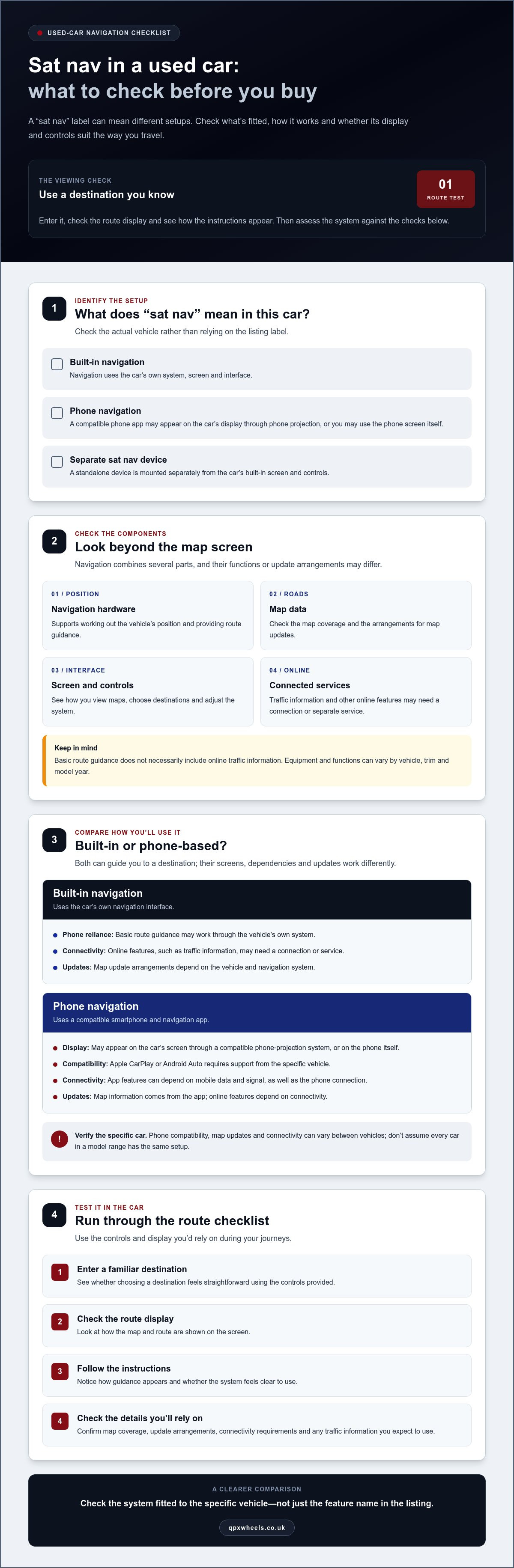
How to test sat nav in a used car before you buy
A few simple checks during a viewing can show whether the navigation system is clear and practical to use. Keep the vehicle stationary while operating the controls. You’re checking how the system behaves, not trying to assess every possible feature during a short visit.
A simple sat nav test during a viewing
Work through these steps in order, and note anything you’d want to investigate further:
- Start the system. Open the navigation screen and check that the map and menus appear clearly. Look for obvious display issues, such as text that’s hard to read from the driving position.
- Explore the controls. Try the touchscreen or physical controls available in the car. Notice whether it’s straightforward to open navigation, move between menus and return to the map.
- Enter a destination. Choose a familiar destination or another place you know how to spell. See how easy it is to enter an address or search for a place, and check that the system recognises your selection.
- Review the route guidance. Look at how the route is drawn and whether the next instruction is easy to understand. If the system offers voice guidance, check where its volume or mute controls are and whether you can hear the instructions while stationary.
- Try phone integration, if fitted. If the car supports a compatible phone connection, check that the relevant navigation display appears and is easy to follow. Don’t assume every vehicle supports phone projection.
Features differ, so focus on what the specific car actually provides. A system may have screen guidance without voice instructions, or its controls may be arranged differently from those in another vehicle. The test should help you decide whether the available functions are comfortable and clear enough for your needs.
Questions to resolve about maps and connectivity
Check which area the map displays and look through the navigation settings for map-version or update information. If the system indicates that an update is available, note what the process involves for that vehicle. Update arrangements vary, so don’t assume they’re the same across different cars.
For connected functions, check which features are accessible in the menus and whether the system indicates that a connection or subscription is needed. If phone integration is present, test the connection whilst parked and see whether the navigation app appears as expected. App-based guidance may depend on your phone and connectivity, so consider how that fits your regular journeys.
Use the same checks when comparing used cars with sat nav UK. A clear map, easy destination entry and route guidance you can follow are more useful than a feature label alone. Note any unanswered points, then weigh them alongside the rest of the car’s condition and suitability.
Once you know what to look for, explore QPX Wheels’ used-car range and keep your navigation checklist in mind as you compare vehicles.
Find your next used car with sat nav through QPX Wheels
You’ve now got a practical way to judge a navigation setup: identify whether it’s built in or phone-based, match it to your regular journeys, then check its display, controls and route guidance in the vehicle. Use the same checklist for every car you shortlist. That makes it easier to compare systems without letting a “sat nav” label distract from the car’s overall suitability.
QPX Wheels sells used cars across the UK and has over 16 years’ industry experience. As you browse, review each vehicle’s information and consider how its described equipment fits your priorities. Compare the navigation setup, screen and connectivity with the features that matter to you. An in-person viewing lets you assess the controls and display for yourself.
What to do after shortlisting a vehicle
Before settling on a car, keep your checks consistent. Note what type of navigation it uses, whether your preferred phone connection is supported, and what you’ve learned about map information and updates. At a viewing, try the system whilst the car is stationary: enter a destination, inspect the route display and check any voice guidance or phone integration that’s fitted. This turns a feature description into a clearer idea of how the system works for you.
Consider the journey involved in buying the car, too. Nationwide delivery is available across the UK, which can be a practical option if you’re purchasing from elsewhere in the country. Review the vehicle information carefully and use your navigation checklist alongside the broader details that shape your decision.
Understand the buying options
QPX Wheels offers HP and PCP finance as options for buyers considering how to fund a used car. They’re different finance routes, so compare the information provided for each and consider which suits your circumstances. Weigh the car’s overall fit and the buying option together, rather than deciding based on the navigation feature alone.
Optional extended warranties are also available. Their terms and cover can differ, so read the relevant information to understand what applies before making a decision. Take the time you need to consider the vehicle and its equipment, rather than feeling rushed by a particular feature.
With a clear checklist, you can focus on the system you’ll actually use and the journeys it needs to support. Browse QPX Wheels’ used cars and compare your options at a comfortable pace, keeping navigation, vehicle suitability and the available buying routes in view.
Choose a car that fits your life beyond the screen
Picture how the car will fit into your routine beyond the moments when you need directions. Consider the comfort, layout and overall driving experience you want day to day. Sat nav can be a helpful part of that decision, but it shouldn’t be the only reason a car makes your shortlist.
As you explore used cars with sat nav UK, give yourself room to compare options at your own pace. A feature that looks impressive in a listing matters most when it works naturally for you and complements a car you’d be happy to own. Trust what you learn from the vehicle details and your own assessment, rather than choosing by a label alone.
QPX Wheels offers used cars to buyers across the UK, with HP and PCP finance options available. Browse QPX Wheels’ used cars and compare vehicles against your needs, including the navigation setup, overall suitability and available buying routes.
Frequently Asked Questions
Is factory-fitted sat nav better than using Google Maps on a phone?
Neither is automatically better; it depends on your priorities and the specific car. You might prefer factory-fitted navigation if you want directions on the vehicle’s own screen, or Google Maps if you’re used to its interface. Compare how each option handles a journey you know, such as a regular trip with a familiar turn-off. For used cars with sat nav UK, judge the system in the vehicle rather than relying on the listing description.
Can I use Apple CarPlay or Android Auto in any used car with sat nav?
No, phone-projection compatibility varies between vehicles, trims and model years. A car can have built-in navigation without supporting Apple CarPlay or Android Auto. If you plan to use either, check the specific vehicle’s equipment information and, where possible, try connecting your phone whilst parked. Confirm whether the connection uses a cable or works wirelessly, as this can affect how convenient the system is for your routine.
How do I know whether a used car’s sat nav maps are up to date?
Look in the system’s settings for map-version or update information, then compare the displayed roads and places with an area you know. A newer road layout may help reveal whether the maps reflect changes you recognise, but it isn’t a substitute for checking the version. Update methods and availability differ between systems. If you can’t establish the map status during a viewing, note it as a point to resolve before deciding.
What happens if the built-in sat nav loses its signal?
It depends on the vehicle’s navigation system and which functions rely on a signal or connection. The route display and online features may not behave the same way if connectivity is interrupted. Don’t assume the system will have offline maps or live traffic in that situation. Check the handbook for the model-specific explanation, and consider whether the system’s basic route-planning functions meet your needs without connected services.
Is sat nav included in every trim of a used car model?
No, equipment can differ by trim, model year and the specification of an individual vehicle. Even two cars with the same model name may have different screens or navigation equipment. Check the details for the exact car you’re considering, then compare them with what you can see in its cabin. This helps avoid choosing based on a brochure, trim description or another example that may not match the vehicle.
Can I update a used car’s sat nav myself?
Possibly, but the method depends on the vehicle and navigation system. The handbook or system menus are the best starting points for instructions that apply to that specific car. Look for details about how updates are obtained and installed, and whether the system indicates that an update is available. Before relying on the navigation for an important trip, check that its existing map coverage includes the places you expect to visit.


